
In 2026, your resume isn’t just a list of past jobs—it’s your strategic marketing tool in a world where AI-powered applicant tracking systems (ATS) scan 75% of applications before a human ever sees them. With skills-based hiring dominating recruitment and employers prioritizing impact over years of experience, a well-crafted resume can be the difference between landing an interview and getting lost in the digital pile.
Whether you’re a recent graduate, mid-career professional, or executive refreshing your documents, understanding how to make a resume that stands out has never been more critical. This comprehensive guide walks you through everything: from choosing the right resume format to selecting powerful skills to put on a resume, avoiding common pitfalls, and building an ATS-friendly document that gets results.
By the end, you’ll have actionable steps to create a professional resume that reflects 2026 hiring realities—clean design, quantified achievements, AI literacy highlights, and natural keyword integration. Many beginners start with free resources or a simple resume builder to speed up the process while keeping full control over customization.
Why Resumes Are Essential in 2026
Resumes remain the gateway to opportunities. Recruiters spend an average of 6-7 seconds on initial scans, so yours must immediately communicate value. Benefits of a strong resume include:
- Passing ATS filters: Modern systems reject poorly formatted files automatically.
- Showcasing transferable skills: Especially valuable for career changers in a skills-first market.
- Highlighting impact: Employers want proof you solve problems, not just duties.
- Building personal brand: A polished resume opens doors to networking and promotions.
Key skills to include in 2026 blend hard technical abilities (like data analysis or AI tools) with soft skills (adaptability, leadership) and emerging AI literacy. We’ll dive deeper later, but think beyond buzzwords—back everything with examples.
What Is a Resume?
A resume is a concise, one- or two-page document summarizing your professional qualifications, experience, skills, and education tailored to a specific role. Its purpose? To secure an interview by proving you’re the right fit.
CV vs Resume
Many confuse the two, but in 2026:
- Resume: Short (1-2 pages), achievement-focused, customized per job. Standard in the US, Canada, and most corporate roles.
- CV (Curriculum Vitae): Longer, detailed academic or research history. Common in academia, medicine, or Europe. Use “CV template” only when requested.
For most applicants, stick to a resume unless applying for research or international academic positions.
Types of Resume Formats
Choosing the right resume format depends on your career stage. The three main types in 2026 remain relevant, with tweaks for ATS compatibility.
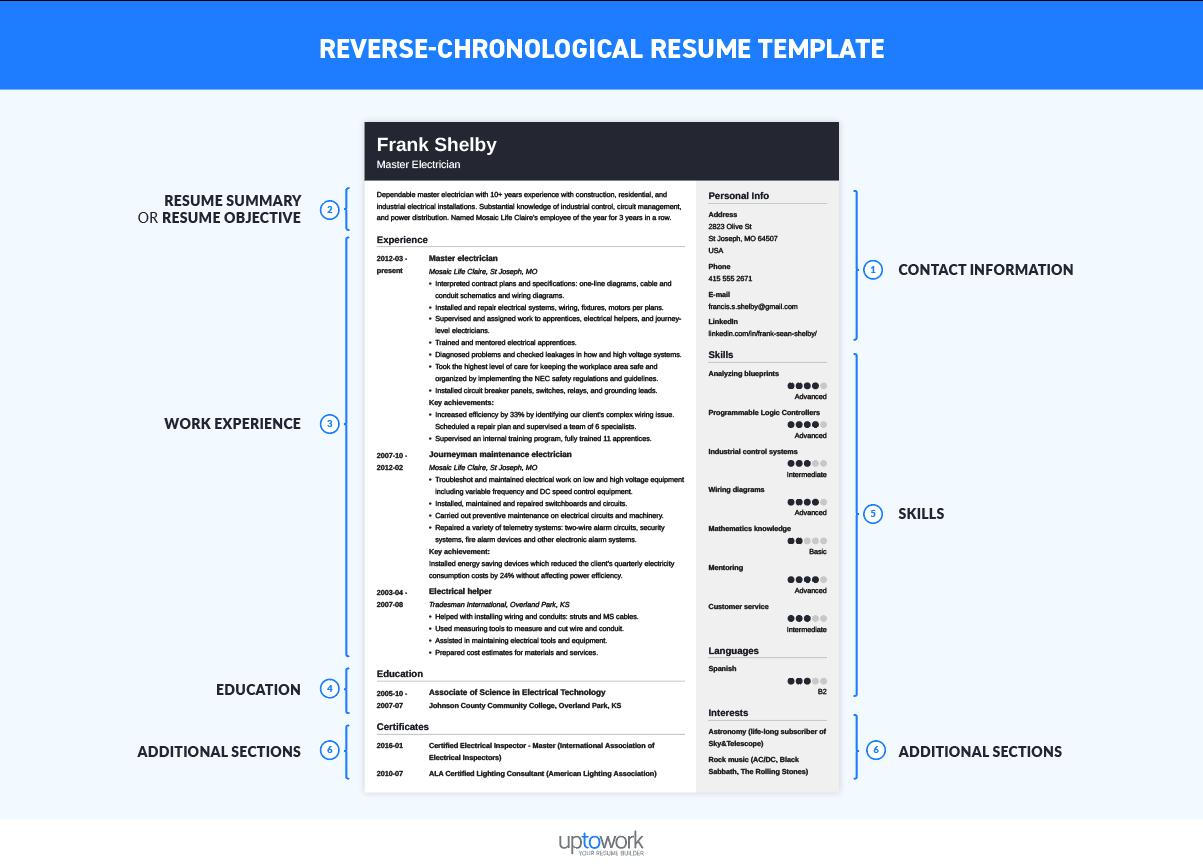
1. Chronological (Reverse-Chronological)
Most popular and recruiter-friendly. Lists experience from newest to oldest.
- Best for: Steady career progressors with no gaps.
- ATS tip: Use standard headings like “Work Experience.”
2. Functional
Emphasizes skills over timeline. Groups accomplishments by competency.
- Best for: Career changers, recent graduates, or those with employment gaps.
- Caution: Some ATS struggle with non-standard layouts—pair with a brief experience list.
3. Combination (Hybrid)
Blends skills focus with chronological experience. Ideal for most 2026 applicants showing both expertise and progression.
ATS-Friendly Tips for All Formats:
- Single-column layout.
- Standard fonts (Arial, Calibri, Times New Roman, 10-12 pt).
- No tables, columns, graphics, or headers/footers.
- Save as .docx or PDF (check job instructions).
- Use exact keywords from the job description naturally.
![Professional ATS Resume Templates for Experienced Hires and College Students or Grads, for free [Updated for 2026]](https://resumeworded.com/assets/images/resume-guides/how-to-images/ats-template-simple.png?job-title=data-analyst)
How to Start a Resume
Starting feels overwhelming, but follow this sequence:
- Gather materials: Old resumes, job descriptions, performance reviews, LinkedIn profile.
- Choose format: Chronological for most.
- Select template: Free options abound, or use a guided resume builder for structure.
- Brainstorm content: List achievements with metrics (e.g., “Increased sales 35%”).
- Tailor early: Match to 3-5 target jobs.
Pro Tip: Create a “master resume” with everything, then customize per application.
Resume Templates
Professional resume templates save hours while ensuring clean design. In 2026, prioritize ATS-safe ones over flashy graphics.
- Free resume templates: Available on sites like Google Docs, Microsoft Word, or Canva (use their ATS versions).
- Harvard resume template or Harvard University resume format: Classic, clean options popular for entry-level and academic roles.
- Google Docs resume template: Simple, collaborative, and fully editable.
- Canva resume templates: Great for creative fields but convert to plain text for ATS-heavy applications.
Customize every template: Adjust margins (0.5-1 inch), add white space, and ensure scannability.
If you want a quick professional start without design headaches, a dedicated free resume builder like Resume Builder at https://therightscoop.net/resume-builder/ lets you input content and generates polished, customizable outputs.
Skills to Include on Your Resume
Skills sections have evolved. In 2026, lead with a dedicated “Skills” or “Core Competencies” area, especially for skills-first hiring.
Hard Skills vs Soft Skills
- Hard skills: Measurable, job-specific (e.g., Python, SEO, QuickBooks, CRM software).
- Soft skills: Interpersonal (e.g., leadership, problem-solving, adaptability).
Balance 60% hard / 40% soft. Always quantify where possible.
Industry-Specific Examples (2026):
- Tech/IT: AI literacy, machine learning, cloud computing (AWS/Azure), cybersecurity, data analytics.
- Marketing: SEO/SEM, content strategy, Google Analytics, social media management.
- Project Management: Agile/Scrum, Jira, risk management, stakeholder communication.
- Sales: CRM (Salesforce), negotiation, pipeline management, lead generation.
- General: Microsoft 365, data visualization (Tableau/Power BI), remote collaboration tools.
Skills to Put on Resume Tips:
- List 8-12 most relevant.
- Use job description keywords naturally.
- For entry-level, highlight transferable skills from internships or projects.

Step-by-Step Tutorial to Build a Resume
Here’s your complete how to build a resume walkthrough. Follow along with a document open.
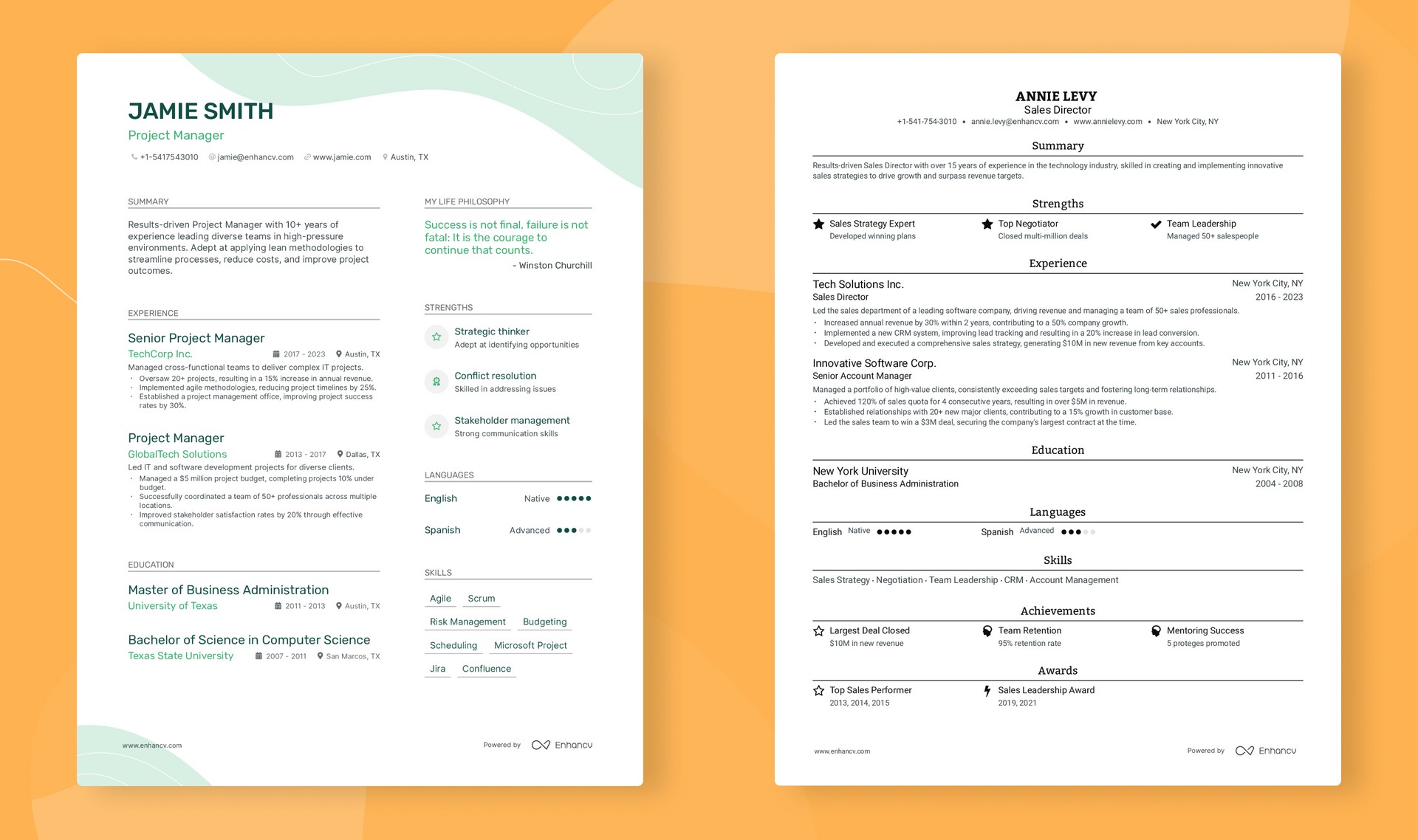
Step 1: Contact Information
Name (large, bold), phone, professional email, LinkedIn, location (city/state). No photo unless creative field.
Step 2: Professional Summary
3-5 lines highlighting who you are, what you offer, and career goals. Example: “Results-driven project manager with 8+ years leading cross-functional teams to deliver 15% average efficiency gains using Agile methodologies.”
Step 3: Work Experience
Reverse chronological. For each role:
- Job title, company, dates, location.
- 4-6 bullet points starting with action verbs.
- Quantify: “Led team of 12, reducing project delivery time by 25%.”
Step 4: Skills Section
Bullet or comma-separated. Prioritize job-matched.
Step 5: Education
Degree, institution, graduation year, GPA (if >3.5), relevant coursework or honors.
Step 6: Additional Sections (Optional)
Certifications, projects, volunteer work, languages, publications.
Resume Examples:
Example 1: Chronological (Mid-Career Marketing) Professional Summary Dynamic digital marketer with 7 years optimizing campaigns that drove $2.3M in revenue growth.
Experience Digital Marketing Manager, ABC Corp, 2023-Present
- Increased organic traffic 45% via SEO strategies.
- Managed $500K annual ad budget with 320% ROI.
Skills SEO, Google Analytics, Content Strategy, HubSpot, SEMrush.
Example 2: Combination (Career Changer to Project Management) Skills
- Project Coordination
- Stakeholder Management
- Agile/Scrum
- Budget Tracking
Experience (Brief chronological list with transferable achievements from previous admin role.)
Example 3: Entry-Level Focus on internships, academic projects, and extracurriculars with metrics like “Coordinated event for 200 attendees, raising $5K.”
Many users report faster results when starting in a guided resume builder environment that suggests bullet points and formats automatically.
Common Mistakes to Avoid
- Overstuffing keywords: Sounds robotic—integrate naturally.
- Typos or inconsistent formatting: Instant rejection.
- Listing duties instead of achievements.
- Using tables or graphics (ATS killers).
- Generic one-size-fits-all resumes.
- Including irrelevant info (age, photo for non-creative roles).
- Making it too long (stick to 1-2 pages).
Proofread multiple times and get a second opinion.
Pro Tips & Advanced Strategies
- Action verbs: Led, Optimized, Spearheaded, Increased.
- Quantify everything: Percentages, dollar amounts, time saved.
- Tailor relentlessly: 80% of success comes from customization.
- Incorporate 2026 trends: Mention AI tools used, remote leadership, or data-driven decisions.
- Use a resume checker: Many free ATS resume checkers online.
- PDF vs Word: PDF for design preservation; Word for ATS safety.
For quick professional results without starting from scratch, a reliable resume builder can apply these strategies automatically while letting you edit freely.
FAQs
How long should a resume be? One page for <10 years experience; two pages maximum for senior roles. Prioritize readability over length.
Can I make an ATS-friendly resume? Absolutely. Use standard headings, avoid fancy elements, and incorporate keywords naturally. Test with free ATS resume checker tools.
Free vs paid resume templates? Free options (Google Docs, Canva) work well for basics. Paid or premium free resume builder tools often include ATS optimization and expert suggestions worth the upgrade for high-stakes applications.
How to write a professional summary? Keep it 3-5 lines. State your value proposition, key achievements, and target role fit. Avoid “objective” statements.
What skills to put on a resume? Mix 8-12 role-specific hard skills with transferable soft skills. Always match the job description and back with evidence elsewhere.
What’s the difference between CV and resume? Resumes are concise and tailored; CVs are comprehensive academic records. Use resume for most corporate jobs.
Should I include a photo or references? No photo unless requested (creative fields). References available upon request only.
Internal Linking Suggestions
To deepen your job search knowledge:
- How to Write a Sample Covering Letter That Gets Interviews
- LinkedIn Profile Optimization Guide for 2026
- Top Interview Preparation Strategies
- Skills Assessment and Development Roadmap
- Career Change Resume Tips
Conclusion
Creating a professional resume in 2026 is about clarity, impact, and alignment with modern hiring—skills-first, ATS-optimized, and achievement-oriented. Follow this guide, avoid common mistakes, and tailor relentlessly. You’ll not only pass automated screens but impress recruiters with a human-centered story of your value.
Take the next step today: Gather your achievements, pick a clean resume format, and build something you’re proud to send. For a quick, polished start with customizable professional options, you can try creating your own resume using the Resume Builder tool at https://therightscoop.net/resume-builder/.
Your future opportunities start with this document. Make it count.
Leave a Reply